
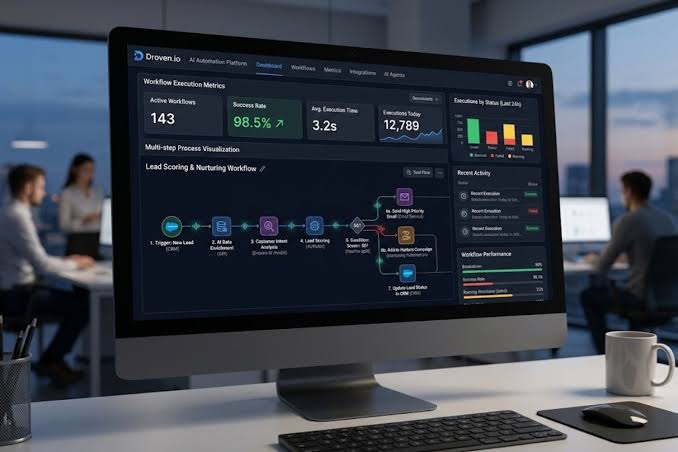
Modern businesses rarely struggle because they lack enough tasks to complete. More often, the challenge is knowing what needs to happen, who is responsible for it, when it should be completed, and how different tasks connect with one another. As teams grow, managing these details through spreadsheets, emails, chat messages, and disconnected applications can quickly become inefficient.
Project management and workflow automation offer a practical solution. By bringing planning, collaboration, task management, and repetitive processes into a more organized system, teams can spend less time managing work and more time actually completing it. Tools such as Droven.io are relevant to this shift because modern project environments increasingly need both structured project management and streamlined workflows.
Why Project Management Is Becoming More Complex
A typical project may involve several departments, multiple deadlines, customer requirements, approvals, documents, and dozens of individual tasks. Even a relatively small project can become difficult to manage when information is spread across different platforms.
Traditional project management often relies heavily on manual coordination. A manager may need to assign tasks, send reminders, update spreadsheets, check progress, and communicate changes individually. While these activities appear manageable at first, they consume considerable time as the number of projects increases.
Another problem is visibility. When team members cannot easily see the current status of a project, misunderstandings and delays become more likely. A centralized project management approach can provide a clearer view of responsibilities, deadlines, priorities, and progress.
What Workflow Automation Adds to Project Management
Project management focuses on organizing work, while workflow automation focuses on reducing unnecessary manual actions within that work.
For example, imagine a content team working on an article. The process might include assigning a writer, completing the draft, sending it for editing, requesting approval, preparing the final version, and publishing it. Without automation, someone may need to manually notify the next person at every stage.
An automated workflow can make these transitions more consistent. When one stage is completed, the next action can be triggered automatically. This reduces repetitive administrative work and helps prevent tasks from being forgotten.
Workflow automation can be particularly useful for:
- Task assignments
- Approval processes
- Status updates
- Notifications and reminders
- Document reviews
- Customer onboarding
- Internal requests
- Repetitive administrative activities
- Project handoffs between departments
The goal is not to automate every decision. Instead, automation should handle predictable activities so employees can focus on work requiring judgment, creativity, and problem-solving.
Centralizing Tasks and Responsibilities
One of the most important benefits of a project management platform is centralization. Instead of searching through emails and conversations to determine what needs to be done, team members can work from a shared project environment.
A well-organized system should make it easy to identify:
- What tasks are currently active
- Who owns each task
- Which deadlines are approaching
- What has already been completed
- Which tasks are blocked
- What needs attention next
This level of visibility can improve accountability. When responsibilities are clearly assigned, team members have a better understanding of their contribution to the overall project.
Managers also gain a broader perspective. Rather than repeatedly asking employees for individual updates, they can review project progress through a centralized workflow.
Reducing Repetitive Administrative Work
Many workplace processes contain repetitive steps that do not require significant human decision-making. Sending routine reminders, moving tasks between stages, updating statuses, or notifying another department are examples.
These activities may take only a few minutes individually, but their cumulative impact can be substantial.
Automation helps by turning predefined actions into repeatable workflows. Once the conditions are established, the system can perform appropriate actions without requiring someone to initiate every step manually.
This can make processes more consistent as well. When a workflow depends entirely on people remembering each step, results can vary. Automated processes provide a standardized structure that can reduce avoidable omissions.
Improving Collaboration Across Teams
Projects often involve people with different roles and responsibilities. Marketing may depend on design, sales may depend on marketing, and customer support may depend on product or technical teams.
Without a clear workflow, these dependencies can create bottlenecks.
A collaborative project management system can make handoffs more transparent. Team members can understand when their work is required and what information they need before starting a task.
This is especially useful for remote and distributed teams. When employees work from different locations or schedules, a centralized system reduces the need for constant real-time communication.
Instead of relying on someone being available to explain the current situation, project information can remain accessible within the workflow.
Better Visibility Into Project Progress
A project is easier to manage when progress can be measured clearly. Managers need more than a list of completed tasks; they need to understand whether the project is moving toward its objectives and where potential problems exist.
Useful project management systems provide visibility into task status, deadlines, priorities, and dependencies. This allows teams to identify problems earlier.
For example, if an important task remains incomplete while several dependent tasks are approaching their deadlines, the issue can be addressed before it causes a larger delay.
Project visibility can also support better resource planning. Managers can see where workloads are concentrated and determine whether responsibilities need to be redistributed.
Automation Should Support People, Not Replace Them
There is sometimes a misconception that workflow automation means removing humans from the process. In reality, effective automation usually works best when it supports human decision-making.
Routine and predictable actions are suitable candidates for automation. Complex decisions, creative work, relationship management, and strategic planning often still require human involvement.
The most effective approach is therefore a balance. Teams can automate repetitive operational steps while keeping important decisions under human control.
This principle is consistent with broader project management practices. The Project Management Institute provides extensive professional resources around structured project management, planning, and effective project delivery.
Choosing the Right Workflow Structure
Before automating a process, teams should understand how the process currently works. Automating an inefficient workflow without reviewing it first can simply make inefficiency happen faster.
A useful starting point is to map the process from beginning to end.
Ask questions such as:
- What starts the workflow?
- Who is responsible for the first task?
- What happens after that task is completed?
- Which steps require approval?
- Where are delays most common?
- Which actions are repetitive?
- What information must be passed between teams?
- What indicates that the process is complete?
Once these questions are answered, automation opportunities become easier to identify.
Measuring the Impact of Automation
Implementing automation is only the beginning. Businesses should also evaluate whether the new workflow is producing measurable improvements.
Potential metrics include:
- Time spent on administrative tasks
- Average project completion time
- Number of missed deadlines
- Task completion rates
- Approval turnaround time
- Number of manual handoffs
- Employee workload
- Process errors
These measurements can help organizations determine which workflows are producing meaningful results and which ones need improvement.
It is also important to remember that successful automation is not necessarily about automating the greatest number of tasks. A simple automation that eliminates a recurring bottleneck can provide more value than a complicated system that automates low-impact activities.
Building More Scalable Workflows
As organizations grow, informal processes can become increasingly difficult to maintain. A workflow that works for five employees may become chaotic when the organization reaches fifty or five hundred.
Structured project management and automation can provide a foundation for scalability. Processes can be documented, responsibilities can be standardized, and repetitive activities can be handled more efficiently.
This does not mean every company needs highly complicated workflows. In many cases, simple and clearly defined processes are easier to maintain than systems containing excessive automation.
The best workflows are understandable, measurable, and adaptable. Teams should be able to modify them as business requirements change.
Final Thoughts
Project management and workflow automation are increasingly connected parts of modern business operations. Project management provides structure around goals, tasks, deadlines, and responsibilities, while automation helps reduce repetitive manual work within those processes.
When implemented thoughtfully, these systems can improve visibility, collaboration, consistency, and productivity. They can also give employees more time to concentrate on meaningful work rather than routine administrative activities.
The key is to start with the process rather than the technology. Identify recurring problems, clarify responsibilities, remove unnecessary steps, and then determine where automation can provide genuine value. With the right approach, project management and workflow automation can become powerful tools for creating more organized, efficient, and scalable operations.